
A little less tech stress.
A real person to help.
Tell us what is happening with your computer. We will help you find the next step, then arrange a repair if you need one.
Ask a question with no account needed. We will reply when available.
Already have a support code?Have a code? Get Support for Windows.
Our portable Windows app connects you to the repair you have arranged with RemotelyFixed. Downloading or opening it does not grant screen access.
Free download. No installer.
Only connect with a technician you have contacted and trust. Never share your support code with an unexpected caller.
File details and publisher verification
- File
- Support.exe
- Version
- 3.6.0
- Released
- Exact file size
- 65,004,992 bytes
- Verified publisher
- Agence Web Wibyo
- Signature checked
Check the Windows signature
- Find Support.exe in your Downloads folder. Right-click the file and choose Properties.
- Open Digital Signatures, select Agence Web Wibyo, and choose Details.
- Windows should report that the digital signature is OK. If the signature is missing, invalid, or shows another publisher, stop and contact us.
A valid signature identifies the publisher and confirms that the signed file has not changed. It does not guarantee that software is safe.
SHA-256 checksum
For customers who want to compare the downloaded file with this release.
e4f5afd0d6b8482d656baac5e35f02c6e7e5f347898b00c8af9280501906966d
If your browser shows a warning
Pause and check the download. A browser may flag an uncommon file, but a warning can also indicate a problem. Confirm the website address and publisher, and contact us if anything is unclear. You can use chat or book a repair while we help you choose the next step.
Ask us about the downloadThree steps. You stay in control.
Example walkthrough. Use the code your technician gives you.
-
 View larger
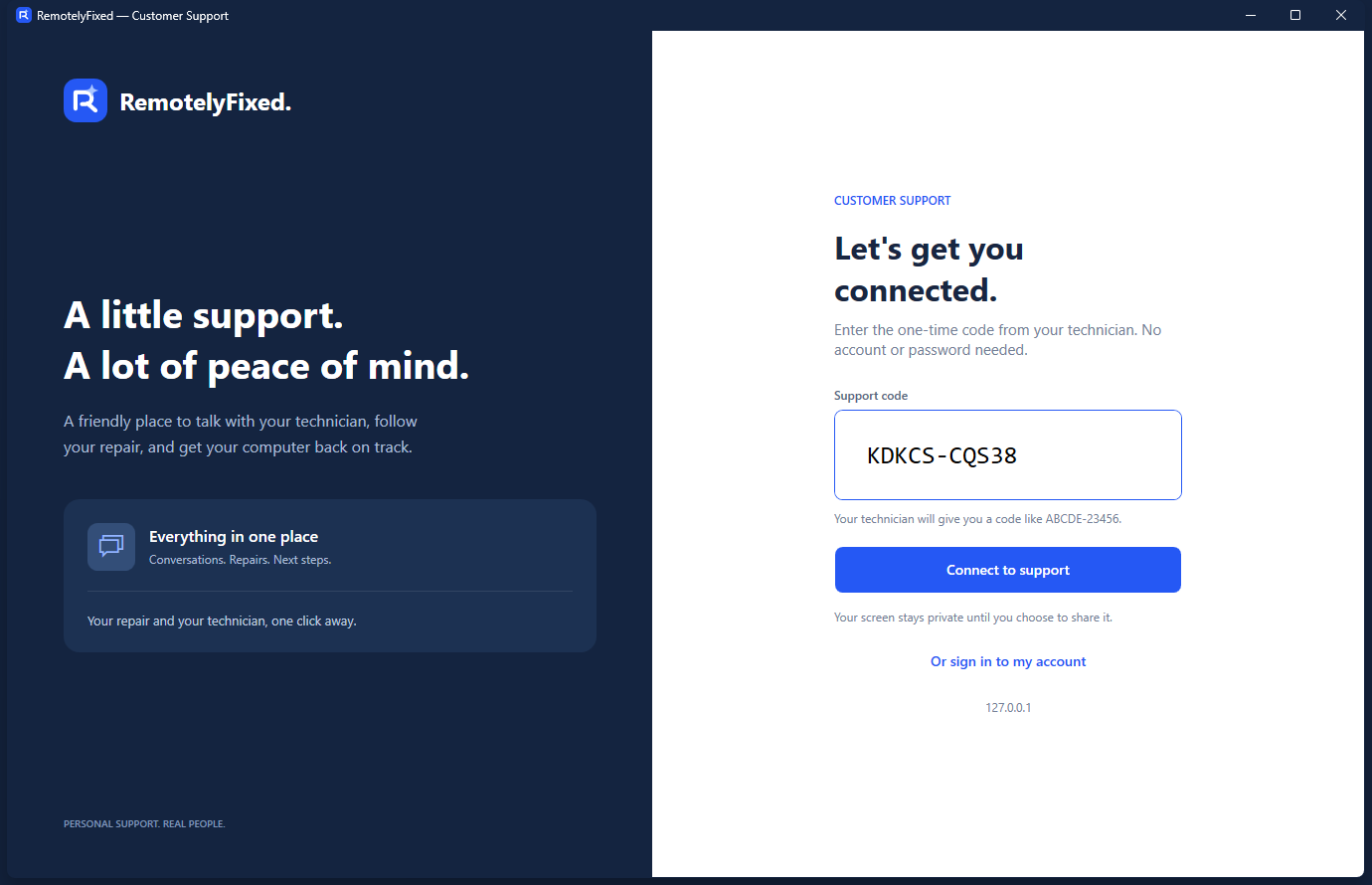
Enter your support code
Arrange support first. Open Support.exe, enter the one-time code from your technician, then choose Connect to support.
-
 View larger
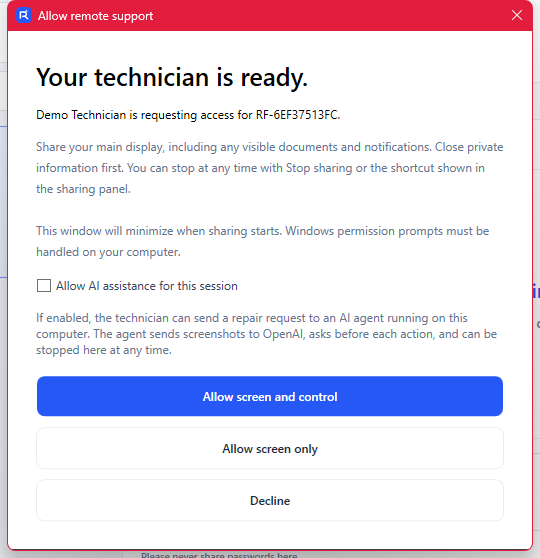
Choose what to share
Review the request. Choose screen viewing only, screen and keyboard control, or Decline. AI assistance has a separate opt-in.
-
 View larger
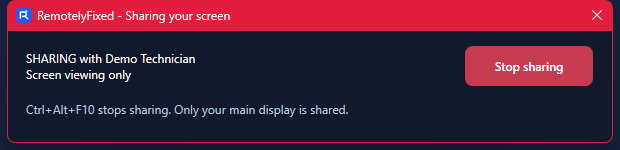
Stop whenever you need
Use Stop sharing or close the app to end access. Your main display is shared during an approved session, so close private documents and notifications first.
Clear information. No surprises.
RemotelyFixed is operated by Agence Web Wibyo, an independent computer support business. We are not affiliated with Microsoft, Apple, or Google.
Visiting this website does not scan your computer or diagnose a problem.
Your screen, your consent
Support.exe lets you enter a technician’s support code, exchange repair messages, and approve a remote session. You choose whether to allow viewing only, screen and keyboard control, or no access.
An approved session shares your main display, including visible documents and notifications. Close private information first. Choose Stop sharing or close the app to end access.
Optional AI assistance
AI assistance requires a separate opt-in when approving screen and keyboard control. If enabled and used, the app sends screenshots and the repair task to OpenAI. A proposed step that includes clicks, double-clicks, typing, key presses, or dragging requires your approval before it runs. Pointer movement, scrolling, waiting, and screenshots can occur without another approval. You can decline a proposed step or stop sharing to end AI assistance.
Cost, booking, and removal
The app download has no charge. Standard booked repairs cost $69.99 CAD, disclosed before checkout; a technician may also invite you to a free support session. Downloading the app does not create a subscription or make a payment.
A booked repair covers the selected software issue. Hardware, parts, third-party software purchases, and unrelated issues are excluded. Your computer must start and connect to the Internet.
The website download is portable: close the app and delete Support.exe to remove it. If you installed the app through Microsoft Store, open Windows Settings > Apps, select RemotelyFixed Support, and choose Uninstall. Sign out first if you used Remember me. Removing the app does not delete your website account or our service records.
Chat with us or email support@remotelyfixed.com.